Learn how to find your blog idea, define your purpose, and do smart research
To write a blog, you need to know what you want to say–and why.
But.
You’re stuck. Blank page. Blinking cursor. Pressure. Nothing is happening.
It’s okay–I know what works. I’m an expert at writing blogs. And this is how I get the blog magic done.
To write a blog, you need:
- An idea
- Purpose
- Expertise, research, knowledge
- An outline
- Time to relax and write
- Distribution and repurposing strategy
And most importantly: confidence and belief in yourself.
This is a three-part series on How To Write A Blog. I recommend you read these in order:
- Start Here – How To Write A Blog (Part One): Get Clear On What You’re Writing
Learn how to find your blog idea, define your purpose, and do smart research. - Get Comfy – How To Write A Blog (Part Two): Becoming A Content Wizard
Learn a stress-free process for outlining, writing, and editing your blog. - Finish Strong – How To Write A Blog (Part Three): Share Your Great Ideas And Content
Learn the keys to repurposing and distributing your blog so the right people read it.
So let’s do it. Let’s make it easier for you to write a blog.
1. An Idea – The First Step In How To Write A Blog
What do you want to write about? What is your lightbulb moment that you want to share? What does your content strategy look like?
Maybe you’ve jotted down a list of blog ideas in your notebook, and then prioritized them?
Or maybe you’re starting from scratch.
Wherever you are in the idea process, this is how you can come up with a lot of blog ideas very quickly:
- Open a new Google Doc, Word file, or Notes file.
- Save or title this blank file as blogideas_<todaysdate>_<yourinitials>.
- In a browser tab, type your website URL, press Enter.
Read your website. - Now write down all the questions people new to your company, brand, products, and services have about what you do and why you do it.
What problems does our primary product solve?
Who needs our products and services?
What do people need to know about our company and why we exist?
Why did we create these products and services?
What is unique about what we do and how we do it?
How do we make life better and easier for our clients and customers?
Keep going. Keep thinking of questions people might have about your company. Approach this like you’re new to the company.
What do you want to know? What questions do you have?
Nothing is too crazy or out there. Just type everything you can think of, these questions can be broad or granular. - Open a new browser tab and type https://www.perplexity.ai/.
- In the What do you want to know? box, type:
Tell me everything you know about <insert your company name here>. Press Enter.
Hopefully Perplexity finds lots of information from a range of sources about your company. (If not, this is okay – this means you’ve got even more ideas for blogs and you know it’s time to update your website…) - Read what Perplexity has collected and understands about your company.
What stands out?
What is missing?
What did this AI tool get right and wrong?
What do you want it to tell people? - Read the People Also Ask questions and click any that interest you.
These are the questions other people are asking (searching for) about your company. You need to make sure they’re getting the right answers to these questions.
Hint: writing FAQ blogs is a great way to educate and support your readers and to communicate your expertise and experience. As an extra bonus, Google loves FAQs, using them in their AI Overviews and featured snippets.
For a bit of background, here’s what Google says about featured snippets and how they’re used: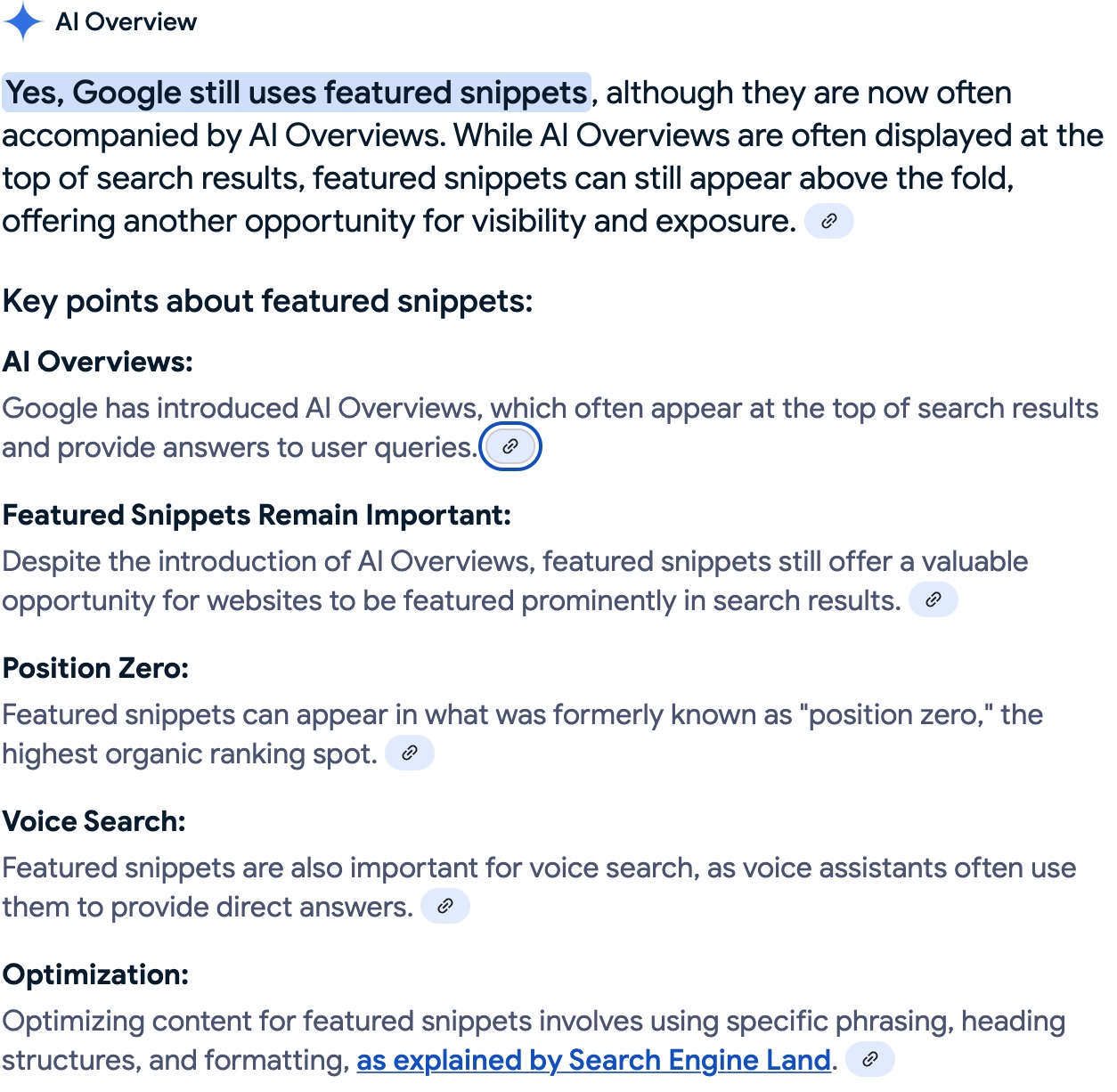
Take a screenshot of these People Also Ask questions and save them in your blogideas_<todaysdate>_<yourinitials> file. - Ask Perplexity a follow-up question, in the text box type:
Based on what you know about <insert your company name here> website and your understanding of our competitor websites, what are the content gaps on these websites? Press Enter.
After reading your website again and analyzing your competitor websites, Perplexity returns a list of content gaps on your website and tells you how you compare to your competitors. - Click Export, choose your file type, and save this information. Ideally, you can insert this in your blogideas_<todaysdate>_<yourinitials> file.
This is great information for discussions with your marketing team, subject matter experts (SMEs), product, and sales teams. - It’s time to get your creative juices flowing. It’s not easy though. Your brain is swirling with all the information that Perplexity told you about your company, blog, website, and your competitors.
Don’t panic. This is when Perplexity helps you cut through the noise in your head.
Ask Perplexity this follow-up question, type:
Thank you. Can you please give me 10 blog topic ideas for the <insert your company name here> website that would help fill these content gaps, provide thought leadership, and set <insert your company name> apart from our competitors?
Click Enter. - Read this list of blog topics. It’s very likely some of Perplexity’s suggestions match or coordinate with the original idea brainstorm you did in steps 4 and 5.
It’s also highly likely that some of these ideas aren’t great. Do not trust everything Perplexity or any LLM tells you–you are the expert. You are the writer.
Click Export, choose your file type, and save this information. Ideally, you can insert this in your blogideas_<todaysdate>_<yourinitials> file. - Stand up. Stretch – reach your arms above your head. Inhale. Exhale. Walk away from your desk and office. Put on your shoes (and jacket). Open the door. Walk around the block. Don’t think. Listen to the birds. Smile at strangers.
And wait for it. It’s happening. Your brain is literally talking to you. The ideas. Wham. Bam. They are coming fast and furious. Don’t panic. Listen to them. Talk back. Keep walking. Remember to breathe. Let the magic happen.
Okay you’re home. Take off your shoes and put your jacket away. Walk calmly up to your office and sit down in front of your computer. - Open your blogideas_<todaysdate>_<yourinitials> file and type. Let your fingers fly.
Write down all the ideas that filled your head. You won’t be able to remember them all. This is okay. Just write down what you can remember. More ideas will come as you’re typing.
How awesome is this?! You have so many ideas for your blog. You’re sitting a little bit taller now in your chair.
You even have a little smirk on your face–writer’s block, idea moat? Not you. You’ve got this. Your new nickname is Idea Wizard. - Well done. Now read through your file – look for duplicate ideas, patterns, themes, and gaps.
Can you take one idea and break into a series?
What is the unique point of view you can include with each idea?
How does each idea help your readers?
Does it provide informational content? Can it help people make a buying decision? Does it answer questions about your products and services?
Don’t delete anything. Move the ideas you don’t like or that aren’t great into a new section titled To Think About. Remember, there is no such thing as a bad idea. These are just ideas that need more help and time. - Now, you need to drill into the gaps in your list. It’s likely you’re missing blog ideas that focus on a hot take, controversial opinion, or unique perspective.
This is because Perplexity (or any other AI tool) is not you. It’s not inside your head. It hasn’t been part of the real-life conversations you have with your colleagues and clients.
Talk to your SMEs – find out what is driving them crazy about your products and services or the direction your industry is heading.
Talk to your sales team – find out what the barriers to sale are for your company.
Visit your competitor websites, read their LinkedIn (and other social posts), subscribe to their newsletter. What are they saying that you don’t agree with? What does your company do better?
This phase of idea generation is when you find the content gold – the content that sets you apart and helps you get noticed:
Your company’s perspective on an industry problem.
A controversial quote from your head of product.
A challenging question from a client and how you solved it.
Good job. This was a lot in a very short period of time. Doesn’t it feel great to have a long list of blog ideas captured in one file?
2. Purpose – The Second Step In How To Write A Blog
Now it’s time to take these ideas and refine them.
You need to define a purpose for each blog idea.
Answer these questions:
- What do you want people to do after reading the blog?
- What problems does this blog solve?
- What is the point of this blog?
- How does this blog help people?
This helps refine your blog ideas and filters out the ones that need more time.
For each blog idea, fill in the blanks in this blog purpose statement:
This blog does <xxxx> for our readers, it <solves problems, answers questions, educates on our company, products, services, provokes with a unique perspective (choose the appropriate options)> and after reading this blog, we want readers to <contact us, sign up for a webinar, subscribe to our newsletter, watch our videos, xxxx, xxxx>.
Hint: if it’s hard to fill in the blanks, this is a sign that your idea is not fully formed yet.
This fill-in-the-blanks process helps you find patterns and themes for your blog ideas. You may find that multiple blogs have the same goal and purpose. The key here is to make sure you’re not writing about the same thing over and over again.
Remember, the overarching purpose of your blog (and website) is to provide helpful information. This is how you build trust and authority and prove expertise and experience with Google, LLMs, and people.
3. Expertise, Research, Knowledge – The Third Step In How To Write A Blog
The more you know, the easier it is to write your blog. The depth of your knowledge correlates to the value and helpfulness of your blog.
Now, don’t freak out. You may be tasked with writing a blog series on quantum physics or why the sky is blue – but you’re not an expert in subatoms or Rayleigh scattering – it’s okay, you can do this.
Here’s an information-gathering plan that works for any subject:
- Open a new Google Doc, Word file, or Notes file.
- Save or title this blank file as blogidea_<topic, theme, keyword>_research_<todaysdate>_<yourinitials>.
Hint: create a separate research file for each blog idea. - Do some preliminary research about your blog idea and topic.
Remember the purpose of your blog and your answers to the four questions in The Second Step In How To Write A Blog. - In Google, type a keyword phrase or question related to your blog idea.
For example, if I was writing a blog about menopause with a purpose of answering the questions women in their 50s have about estrogen, I would start with the following search query:
What does estrogen do in the female body?
This returns a generic AI Overview about estrogen and some useful links to leading health websites. - Read the AI Overview information and scroll down in the search results page to read the top four or five search results.
If you’re lucky, Google will show you the People Also Ask questions related to your search query.
Click the links, read, learn, take notes in your blogidea_<topic, theme, keyword>_research_<todaysdate>_<yourinitials> file.
Now you have the basic information you need. It’s time to dig deeper. - Click the People Also Ask questions and read these answers.
Ask follow-up questions that come to mind. For example, for my menopause and estrogen-focused blog, I might ask:
Why is estrogen important for women in menopause?
This second level of searching helps you dig into the crux of your blog idea and purpose. You want to keep asking, digging, clicking, and taking notes.
Remember to copy the URLs for the source pages you’re using for information gathering.
Hint: click in the Google search box to see adjacent questions people are searching for. This tells you what people are searching for about your blog idea.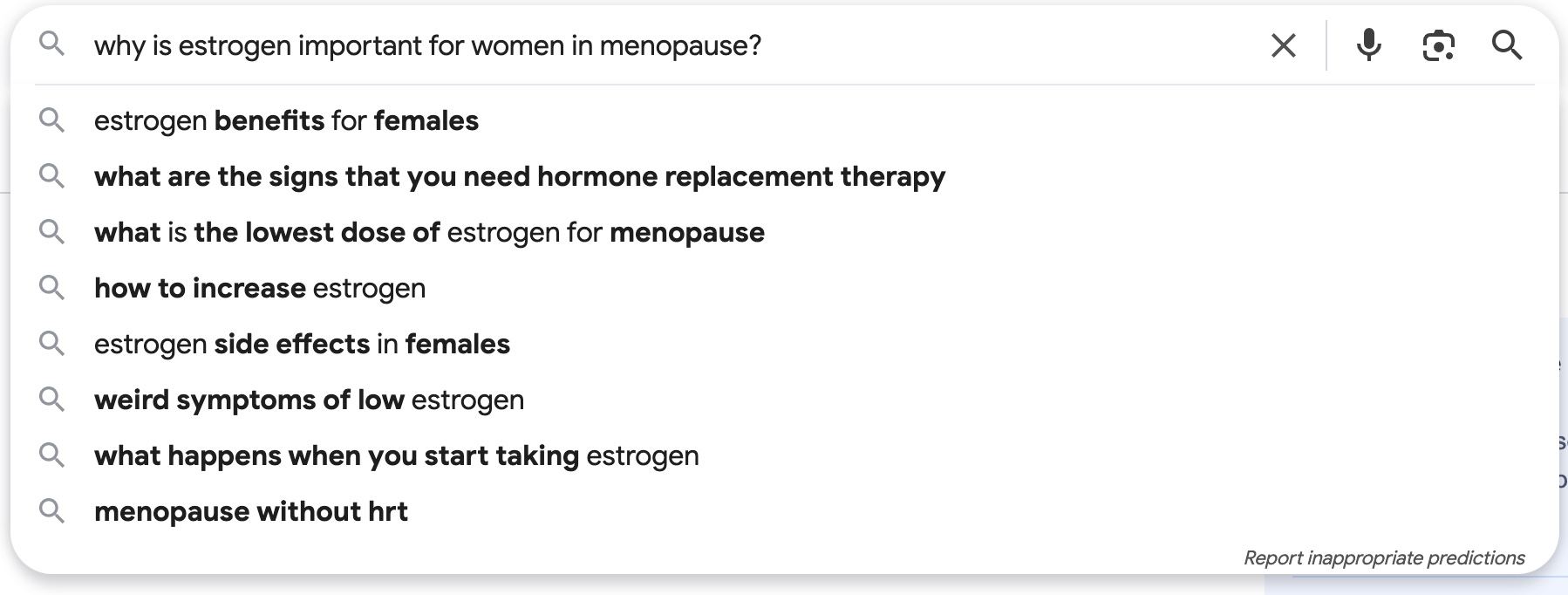
- Open a new browser tab and type https://www.perplexity.ai/.
- In the What do you want to know? box, start asking your questions about your blog idea and topic.
Based on what you learned from Google, this is your chance to have an interactive conversation with the AI tool about your topic.
For example, for my menopause blog, I might ask:
Since estrogen is a critical hormone for women, why are so many doctors resistant to prescribing HRT?
And then I would ask a follow-on question based on the Perplexity summary:
Aren’t the studies about HRT outdated and proven to be incorrect?
As you can likely conclude, the purpose behind my menopause blog is to bust the myths and misinformation about menopause, estrogen, and HRT supplements.
You can use the same type of research, questioning, and discussion with Perplexity to help you learn and understand what is being said and not said about your blog idea and topic. - Click Export, choose a file type, and add this information to your blogidea_<topic, theme, keyword>_research_<todaysdate>_<yourinitials> file.
- Keep going with your questions and research. Don’t hesitate to flip back and forth between Google and Perplexity. And yes, if you have another LLM you prefer – use it.
You’re in the information gathering stage here. You’re trying to learn everything you can.
Remember to use the People Also Ask questions to keep digging and to understand the types of information people want to know about your blog idea. - Now it’s time to talk to SMEs. You can learn a lot from the Internet, but as you know, nothing compares to real-life first-hand information.
And I know, it can be tough to get your SMEs to make time to talk to you.
Scheduling a call with an SME or providing the SME with a blog brief template can be effective ways to collect the information you need:
SME Call
Schedule a call with your SME to ask them questions about your blog idea and topic. Before the call, send the SME your list of questions. This gives them time to prepare and proves that you do know what you’re talking about and won’t be asking them basic questions.
If you can, record the call so you can focus on listening and asking follow-up questions rather than frantically typing.
Always ask the expert: “What do you want people to know about <insert topic, problem, product, feature, etc.>?” This is a great way to unlock the information nuggets that can add real value to your blog.
Close the call with reminding the person that they can send you an email with anything that comes to mind about the topic or idea.
Blog Brief
Your SMEs may prefer to send you a document that summarizes the blog topic or idea.
I suggest you create a template that people can fill out.
Here is an example ChatGPT prompt I used to create a generic blog brief template: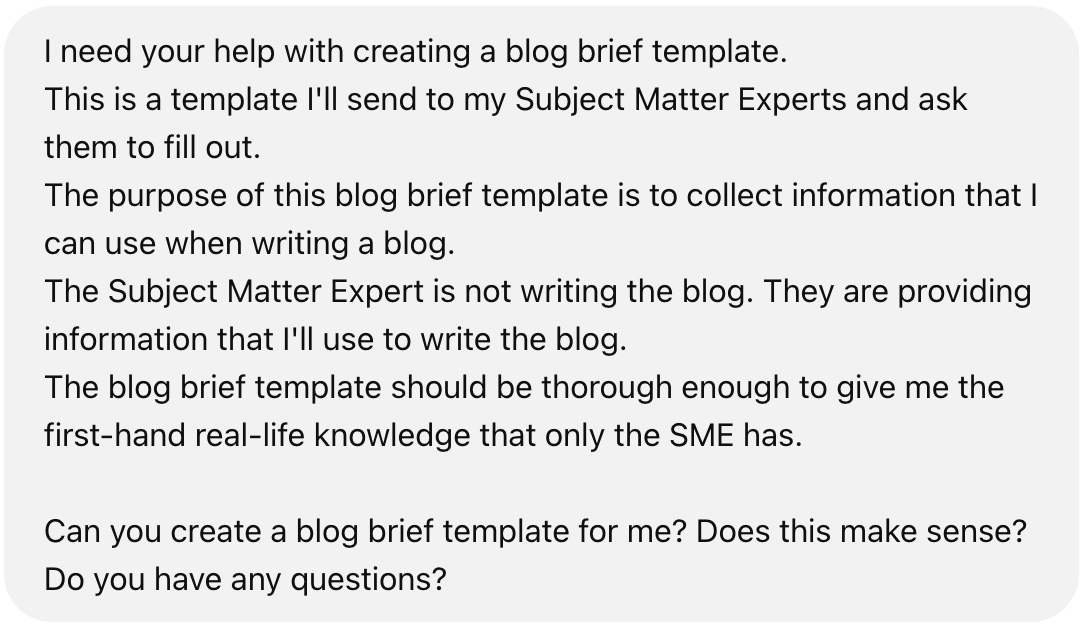
You can edit this ChatGPT prompt to be specific to your SMEs, company, and blog topic idea.
Here is the basic blog brief template ChatGPT created: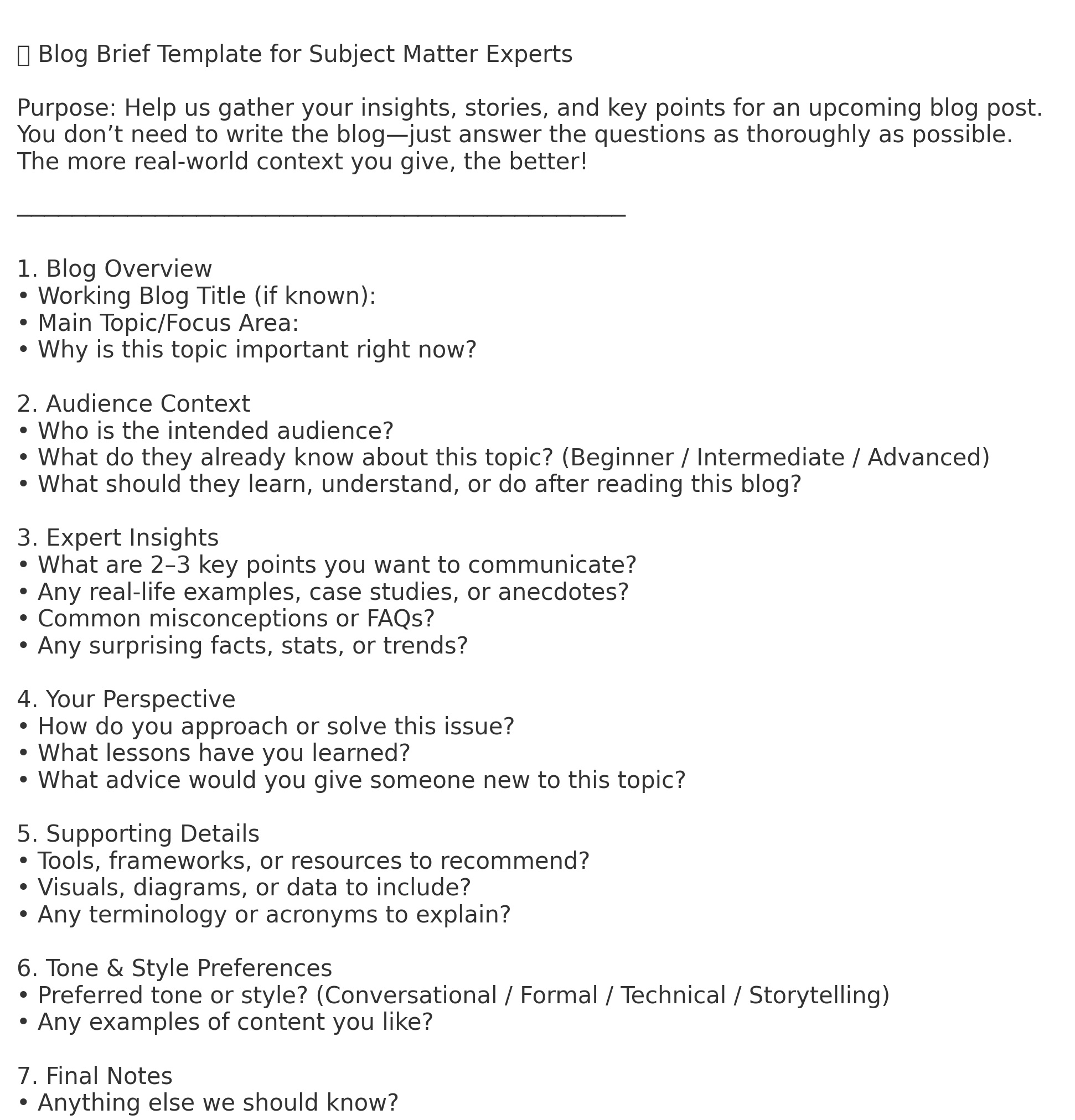
I would add some notes to this blog brief template in sections 1 and 2, since this information is related to your blog idea and topic.
If you hit obstacles with connecting with your SMEs, another option is to take advantage of your company’s internal and external resources.
Look for public and internal webinars, slide decks, data sheets, brochures, recorded sales calls, etc.
These resources are an ideal way to learn about the questions customers have, barriers to sale, product and service development plans, and more.
Honestly, this phase of writing a blog can be endless and limitless. But you have to draw the line on research. It’s super easy to get caught up in research as a way to procrastinate writing your blog…
A good way to measure your knowledge is to start writing your outline. If you get stuck or end up staring at a blank screen, you need to keep learning.
TL;DR Part One of How To Write A Blog: Get Clear On What You’re Writing
Say goodbye to the blinking cursor and blank page fright.
This three-step process kicks you into Idea Wizard mode:
- Start With An Idea
Think about what your audience wants to know, the problems your products or services solve, and the questions people are asking.
Use Google and Perplexity to brainstorm and research blog topics.
Talk to your SMEs.
Write down everything. Let it get messy. The ideas will come.
Trust yourself. - Define Your Blog’s Purpose
Clarify what the blog does, who it helps, and what action you want readers to take.
Use the fill-in-the-blank blog purpose statement to make sure your ideas are strong, clear, and useful.
This blog does <xxxx> for our readers, it <solves problems, answers questions, educates on our company, products, services, provokes with a unique perspective (choose the appropriate options)> and after reading this blog, we want readers to <contact us, sign up for a webinar, subscribe to our newsletter, watch our videos, xxxx, xxxx>. - Collect Expertise, Research, and Knowledge
Gather your knowledge using Google, AI tools, and SMEs.
Take notes, ask questions, and stay focused on the information people are actually looking for.
Know when to stop researching—so you don’t procrastinate writing.
You’ve got the ideas. You’ve got the purpose. You’ve done the research.
You know what your blog is about, why it matters, and what people need to know. This is huge.
In How To Write A Blog (Part Two): Becoming A Content Wizard, we’ll move from prep to action.
I’ll show you how to build a simple, flexible blog outline and create the time and space to actually write your blog—without pressure, burnout, or second-guessing yourself.
You’re ready. Let’s go write your blog. It’s time for Content Wizard mode.
I’m here to talk about your words, your website, and how I can help your clients find and trust you.
To hire me to write for you–send me an email. I’m always happy to help you out.
 Good Words Work